SunriseHours

Every work-based learning hour, logged and verified, without the chasing.

SunriseHours is the system of record for high-school internship and career programs. Students log hours on their phones, supervisors verify with one tap, and coordinators start each day knowing exactly who needs them.

Built in Ohio for the state's 250-hour graduation option. Free pilot through June 30, 2027 for founding Ohio programs; no purchase order, no automatic renewal.

See it in a minute.

A student logging a day, a supervisor verifying a week, a coordinator's morning, and the Ohio graduation view. Real screens, with sample data from a fictional Ohio county.

    SunriseHours in one minute

    A day with SunriseHours

    Four people, four screens, one record. Each sees only what their role needs.

    7:40 a.m. The coordinator

    Before first period, the dashboard has already sorted the day: who is behind on logging, which exemption requests are waiting, whose hours need a supervisor, which reflections are late. Each line opens the list behind it.

    Every student's record is one click away, with the goal, the calendar, notes, messages, and every change on the audit trail.
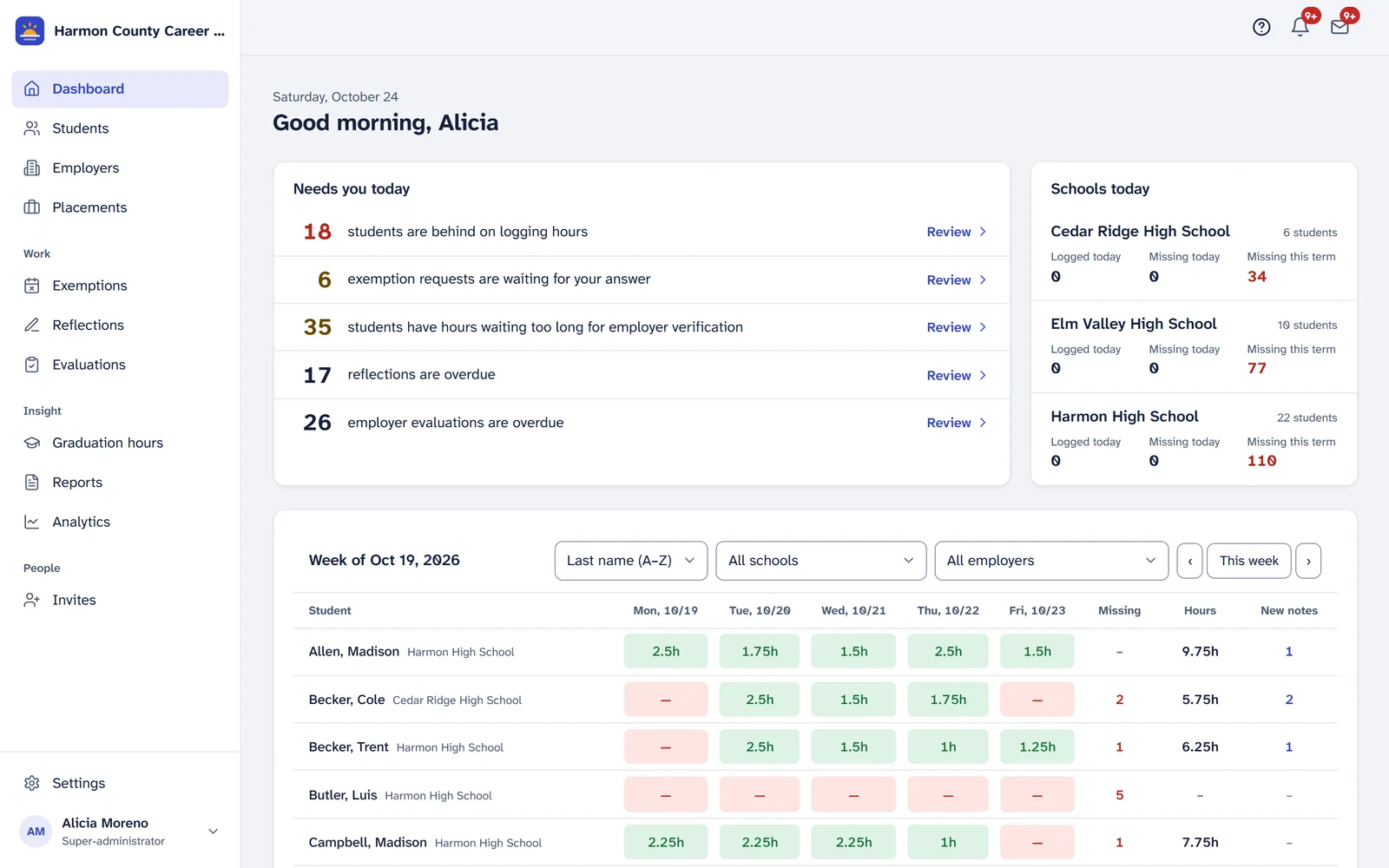
    The coordinator dashboard: a Needs you today list with counts and Review buttons, schools today, and a week grid of every student.

    3:15 p.m. The student

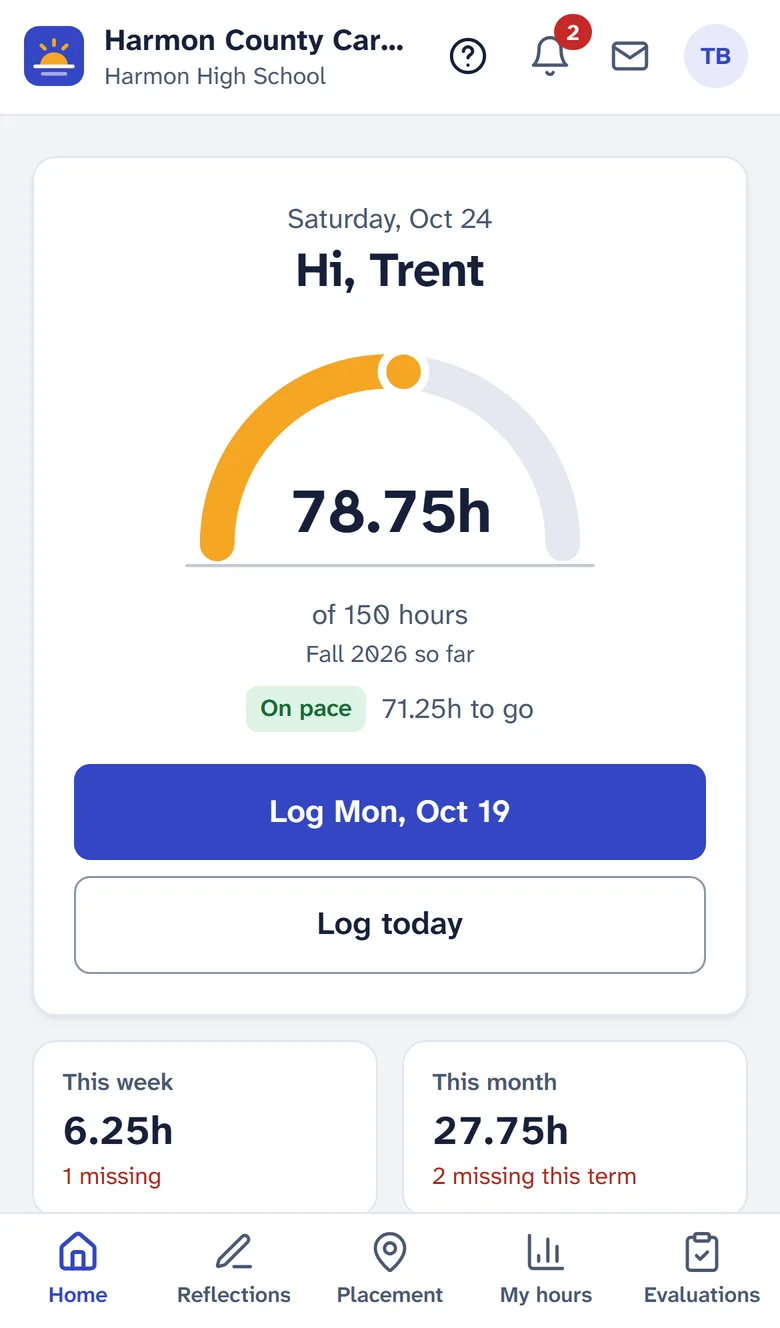
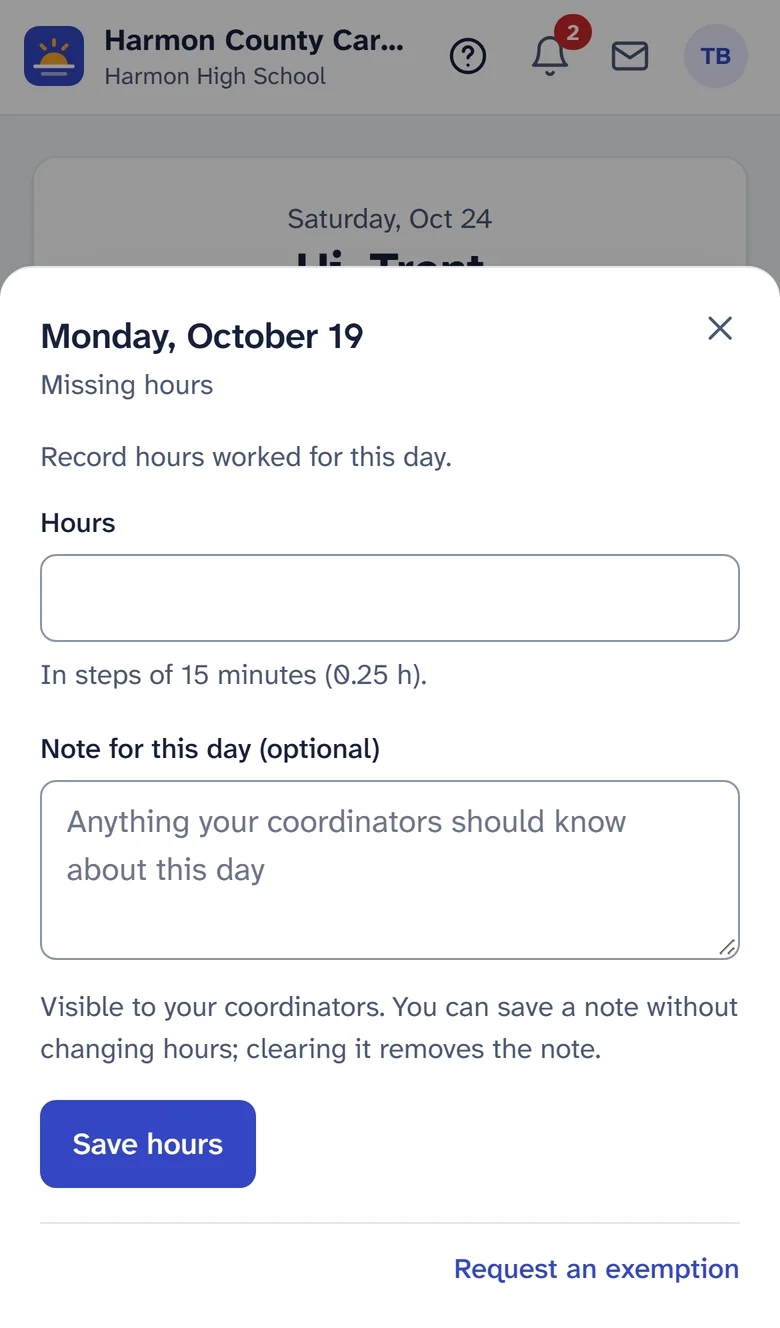
    On their own phone, a student sees how far they've come this term, whether they're on pace, and one button for the day they still need to log. Tap, type the hours, save. About fifteen seconds.

    Nothing to install, and it works on a school Chromebook too.

    Student home on a phone: a sunrise-shaped progress arc showing 78.75 of 150 hours, an On pace badge, and a Log Mon, Oct 19 button. The day sheet for Monday, October 19, with an hours field, an optional note, and a Save hours button.

    4:30 p.m. The supervisor

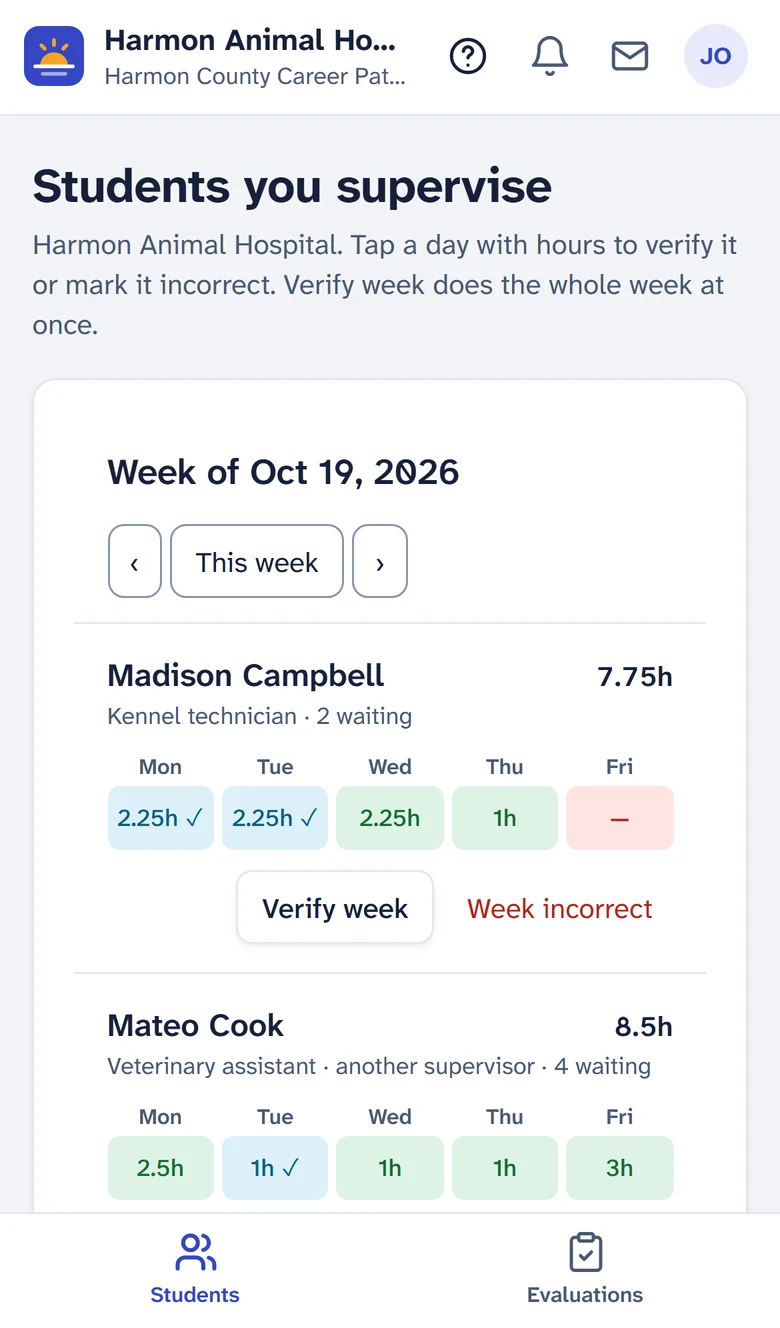
    Employer supervisors get one card per student with the week's hours. One tap verifies the week. If a day is wrong, they say why, and the coordinator decides.

    Supervisors see a student only once that placement's training agreement is on file.

    Supervisor view on a phone: cards for each student with Monday through Friday hours and a Verify week button.

    8:00 p.m. A parent

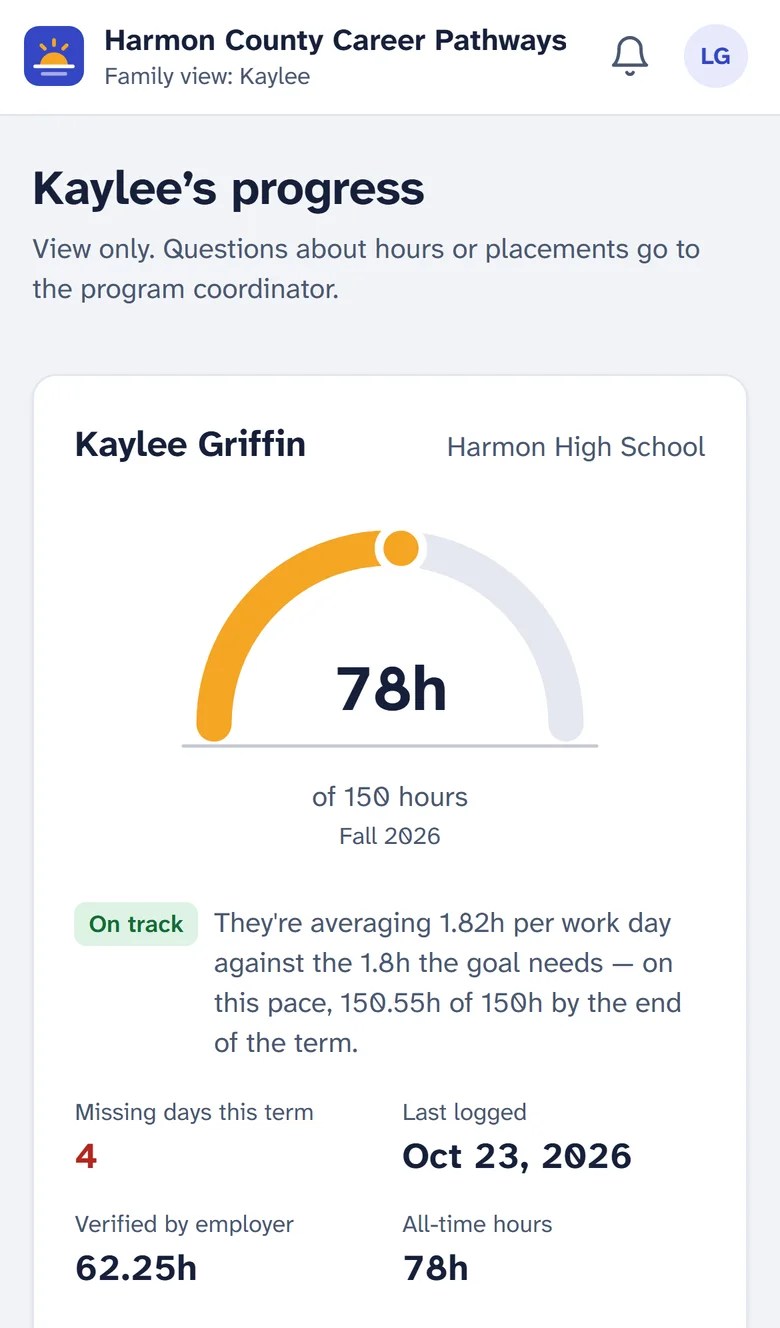
    If the school turns it on, a parent or guardian sees their own student's progress: hours, pace, the last two weeks, the placement and supervisor. Read only. Never messages or notes.

    Parent view on a phone: the student's progress arc, pace, missing days and verified hours.

    Try it

    Click the highlighted spots to walk through the coordinator's side. Sample data from a fictional Ohio county.

    Built for Ohio's 250 hours.

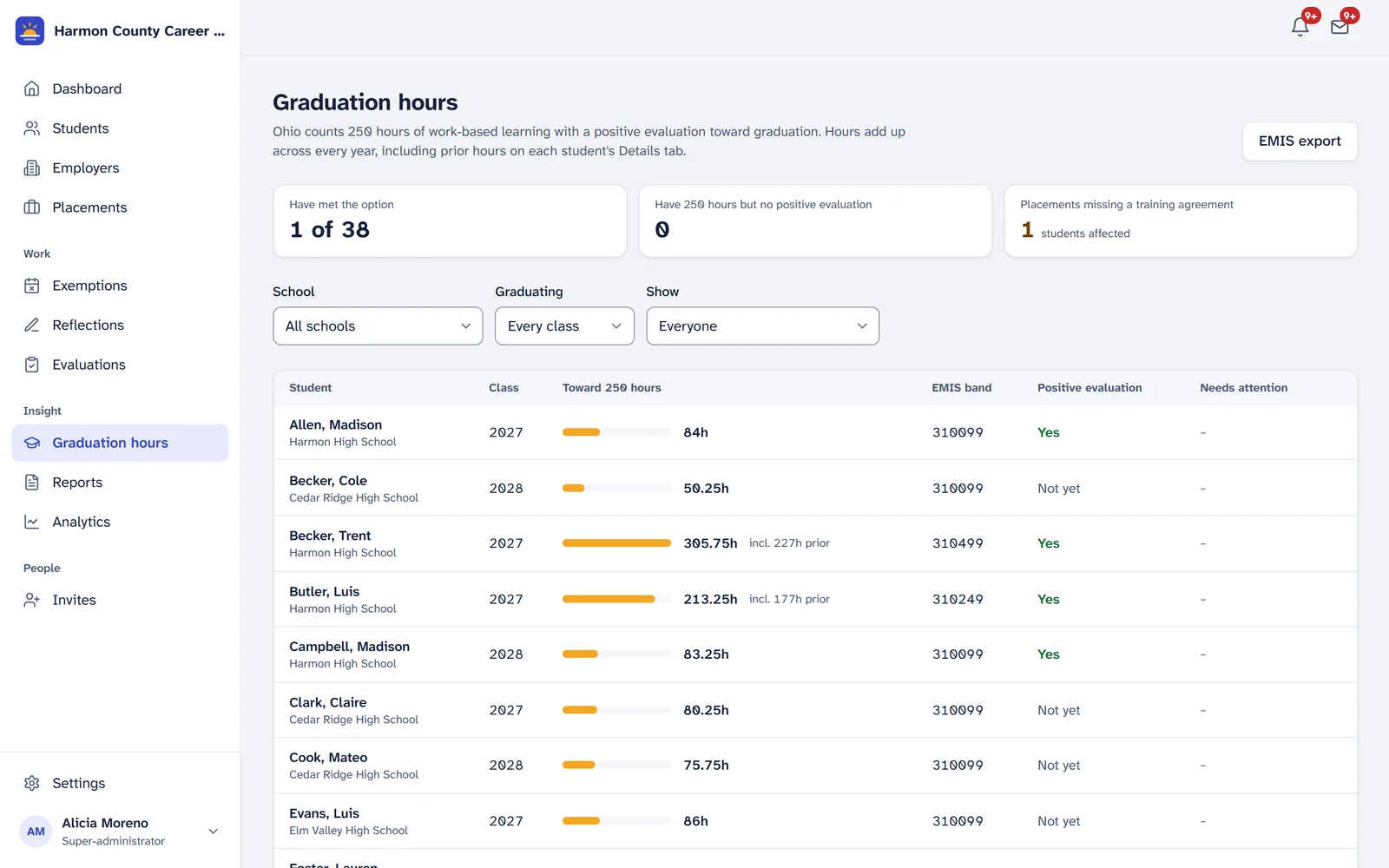
    Ohio counts 250 hours of work-based learning with positive employer evaluations toward graduation (ORC 3313.618). SunriseHours keeps that count for every student, across every year.

    Cumulative hours
    Every year added together, including hours from earlier paper logs entered as prior hours.
    Positive evaluations
    Supervisors rate students on their phones; coordinators record which evaluations count.
    EMIS-ready report
    Each student's Student Program (GQ) codes for the work-based learning type and the hours band, as Excel and PDF for your EMIS coordinator.
    Ohio fields
    SSID, building and district IRNs, WBL type, paid or unpaid, career field, and the training agreement date.
    The Graduation hours page: each student's progress toward 250 hours, prior hours, EMIS band and positive evaluation status.

    Fits the systems you already run

    Rostering

    Bring students in from your student information system: OneRoster files or API (PowerSchool, Infinite Campus, ProgressBook and DASL exports, ClassLink Roster Server) or a simple spreadsheet. Every import shows a preview before anything changes, and students who leave are archived, never deleted.

    District sign-in

    Students and staff sign in with the school Google, Microsoft or ClassLink account they already have. Accounts link only through your district's own domain or tenant, never by email alone.

    Getting data out

    Every report as Excel and PDF, a complete record PDF for any student, and a ZIP of everything your program holds whenever you want it.

    Student data, handled like it should be.

    • We sign the Ohio data privacy agreement (OH-NDPA) and follow Ohio's student-data law.
    • Each role sees only its own students; employers only after the training agreement is recorded.
    • Every change is on an audit log that no one can edit, us included.
    • Administrators use two-step sign-in, and sessions time out with a warning first.
    • When you leave, you get all your data, and ours is destroyed with a certificate.
    • Built to WCAG 2.1 AA as a target, in a typeface designed for low-vision readers.

    What we won't do

    • Sell student data, or use it for advertising.
    • Show ads to anyone.
    • Charge you for every enrolled student.
    • Lock your records in.
    • Open a student's record for support without your super-administrator's time-limited permission.

    Simple pricing, for the students in your program

    One price per program per year, on the Ohio fiscal year. You pay only for students in work-based learning, not every enrolled student. Every plan includes every feature.

    $1,200

    Starter

    up to 100 students

    $2,400

    School

    up to 250 students

    $4,200

    District

    up to 600 students

    $7,200

    Career Center

    up to 1,500 students

    Every plan: unlimited staff, supervisors and parents; rostering and district sign-in; Ohio graduation tracking and the EMIS report; remote setup and training; no setup fee and no add-ons. Over 1,500 students: about $4 a student. Optional on-site training day: $500.

    Founding Ohio programs: a free pilot through June 30, 2027, with no automatic renewal. If you then subscribe, your price is locked for three years.

    Who you'd be working with

    I'm Robert Spath. I live in Ohio, and I built SunriseHours with a working Ohio high school career program, one coordinator request at a time. I do the setup and the support myself.

    SunriseHours is new. If you start a pilot, you'd be one of the first programs to use it, and I'll treat it that way: I'll set up your schools, terms and placements with you, and you'll have my email and phone.

    Robert Spath, founder

    Questions

    We already have a college-and-career suite. Why this?

    Suites like Xello, SchooLinks or Naviance are priced on every enrolled student and cover many things. SunriseHours does one job, work-based learning hours, and you pay only for the students in it. Many programs still run hours on paper beside a suite; this replaces the paper.

    Why not Google Forms?

    A form collects entries. It doesn't know who should have logged today, can't get a supervisor's verification, doesn't add up 250 hours across years, and doesn't produce the EMIS codes. And student data in a personal form isn't covered by a data privacy agreement.

    What about students without a phone?

    SunriseHours works in any browser, including a school Chromebook or a library computer. Coordinators can also enter hours for a student.

    How long does setup take?

    Usually an afternoon. We add your schools and terms together, import students from your student information system or a spreadsheet, and invite supervisors. District sign-in can be turned on whenever your IT team is ready.

    Where is the data stored?

    In the United States, with a hosting provider that encrypts it at rest and in transit. It's never sold, and you can export or delete it at any time.

    Is it accessible?

    It's built to WCAG 2.1 AA as a target, with text-size, contrast and color-blind symbol options for every person, and a typeface designed for low-vision readers. Ask for the accessibility statement.

    What happens after the pilot?

    Nothing automatic. If you want to keep going, you subscribe at the founding price, locked for three years. If not, you take your data and we destroy ours, with a certificate.

    See your own students in it.

    Tell me about your program, and I'll set up a pilot with your placements.

    Send your request from

    Or email robert@sunrisehours.com